Mobile App Development: The Ultimate Guide (2026)
Have you ever thought, “I could build something like this” after using a mobile app?
Mobile applications are the lifeblood of our digital world, and developing them can be an exciting and gratifying experience. But where do you begin?
From ideation to implementation, the mobile app development process can appear complex and frightening.
With the right direction and resources, you can make your app idea a reality ✨.
In this blog article, we’ll take you on an adventure through the thrilling world of mobile app development.
You’ll learn how to plan and design your app, select the appropriate technology stack, understand the development process, and release it to the public.
So tighten your seatbelts and prepare to embark on an exciting ride through the app development process!
What is Mobile App Development?

Mobile app development is the process of designing software programs that run on a mobile device, such as smartphones and digital assistants, and then connecting to remote computing resources via a network.
It’s a comprehensive procedure that requires a significant amount of time, effort, and resources to be completed successfully. There are several software development methodologies, including waterfall, agile, DevOps, and rapid application.
For example, apps can make use of smartphone features such as GPS, Bluetooth, a camera, a microphone, and other built-in functions.
Mobile App Development Platforms
When it comes to app development platforms, iOS and Android have the most promise for ambitious mobile developers, regardless of their target audience’s region.
However, how can you know which mobile app development platform is the best? This is dependent on your goals and the experience level of your mobile app developer.
If your developers are complete beginners at coding, you will surely benefit from Apple iOS’s more controlled ecosystem. Apple’s Xcode development user interface provides less customization but more standardization, lowering development costs and saving time.
If your developers are knowledgeable in coding or UI design and are familiar with Java, Android should be a better fit.
Android programming takes more time, but also provides a more thorough insight of the inner workings of mobile development. Android needs more fundamental work and cognition, but iOS offers shortcuts.

For iOS App Development
Because iOS provides a more controlled ecosystem, a more mature and user-friendly development tool, and a platform that leads to income generating, we recommend that new mobile app developers begin with iOS app development.
What is beneficial about iOS development?
- User-friendly development tools that decrease coding time and effort
- Large market share in the United States
- Highest Revenue-generating platform to date
- Slightly higher earnings potential
However, if you do not own a Mac computer and do not intend to get one, Android app development is recommended because of the extra benefits described below.
For Android App Development
Experienced Java programmers may find it easier to transfer to Android app design than to learn Swift. Here are some additional features for Android app development.
- Several development tools are available
- It’s easier to get new apps onto Google Play than the App Store
- Uses the Java language, which provides additional potential use cases for long-term professional benefits
- Cross-platform development tools can be utilized on Windows, Linux, and Mac
Mobile App Development Approaches
Before investing in a mobile app, a corporation must decide how to build it. Native apps, cross-platform apps, hybrid apps, progressive web apps, and rapid mobile app development are the most common methods.
Here is an overview of each of them:
A. Native Mobile App Development
Native mobile app development is creating a mobile app that only runs on a certain platform, such as iOS or Android. In other words, native apps are software designed just for one platform.
Native app development allows mobile developers to create programs that are native to their operating system. This includes desktop computers, smart TVs, cellphones, and any other digital technology.
It cannot be utilized in the browser, as websites and web apps can. They must be downloaded from platform-specific app stores such as Apple’s App Store and Google Play Store. After installation, each app can be launched by tapping its icon on the device’s screen.
There are many advantages when it comes to native mobile apps:
- The best performance in terms of speed and responsiveness because they are built expressly for a specific platform and compiled using its core programming language and APIs
- More secure
- More engaging and intuitive because they are OS-specific
However, it does have certain drawbacks:
- Costly
- Time-consuming
- Require frequent updates
Here are some common examples of mobile apps that use native app development:
- Waze
- Spotify
- Google Maps
B. Cross-Platform Mobile App Development
Cross-platform mobile app development uses a single codebase to produce apps that can operate on many platforms, including Android and iOS.
Cross-platform development enables developers to create programs that run on many operating systems and platforms, including smartphones, tablets, and web browsers. This differs from typical app development, which necessitates creating unique copies of an app for each platform.
Many people believe that cross-platform and hybrid techniques are interchangeable, yet the only thing they have in common is code sharability.
Cross-platform app development frameworks are becoming more robust, allowing for greater consistency and bringing the UX closer to that of native mobile apps. Because this technology uses web-based code, many organizations utilize it to run fully working e-commerce apps on multiple platforms.
The benefits of cross-platform mobile applications include:
- Rapid development with decreased cost because developers don’t need to understand numerous technologies
- The apps have a single codebase, allowing for code reuse
- Excellent product maintenance
Drawbacks of cross-platform mobile app development:
- Compared to native mobile apps, performance is slower, and the user experience is weaker
- Developers must adapt to a limited number of platforms, necessitating additional technical abilities
- Difficult to adapt to local environments
Some instances of cross-platform mobile applications are:
- Communication tools include Skype, Slack, and Bloomberg.
C. Hybrid Mobile App Development
The combination of native and online solutions is referred to as hybrid app development. To obtain access to native functionality, mobile app developers must use plugins that contain code written in languages such as CSS, HTML, and JavaScript.
The code is only written once and can be reused on other computers. When you design a hybrid app, you can ensure that the performance and user experience are equivalent to native apps. Nonetheless, hybrid app creation must enhance the user experience and navigation patterns.
Here are a few benefits of hybrid mobile apps:
- Work on numerous platforms.
- Shorter development timeframe because these apps do not need any native prerequisites.
- Reduced cost because developers do not have to invest in designing apps for many platforms.
Although hybrid mobile apps are fantastic, there are certain drawbacks to cross-platform mobile apps:
- Poorer performance and UX than native mobile apps
- Require a continual internet connection to function.
- Plugins are required to access a device’s built-in functionality, hence their possibilities are limited.
Some examples of hybrid mobile apps are:
- Gmail Instagram
- To learn more about Evernote, check out this infographic.
Mobile App Development Frameworks
Frameworks for mobile app development are essential tools that allow developers to create better apps in less time.
In layman’s words, these are the templates or core frameworks that help developers construct and optimize applications.
Let’s take a look at the top three most popular frameworks, including their features and benefits.
A. React Native
React Native is a popular open-source JavaScript-based mobile app framework that enables developers to create natively rendered mobile apps for iOS and Android.
It combines the greatest features of native programming with React, a high-end JavaScript toolkit for developing user interfaces. The libraries offer uniform and rapid development experiences for Android and iOS applications. Well-known firms use the React Native technology, including Airbnb, Skype, and Amazon Prime.
React Native has several essential features, including:
Cross-Platform Development
React Native allows developers to write code once and deploy it to multiple platforms, including iOS and Android, without the need for multiple codebases. This reduces development time and costs while creating and maintaining mobile apps.
High performance
React Native uses a high-performance native rendering engine, making it ideal for creating sophisticated, high-performance mobile apps.
Large Developer Community and Ecosystem
React Native has a huge and active developer community that provides access to a diverse set of tools, frameworks, and resources. This makes it easier for developers to get help and create high-quality mobile apps faster.
B. Flutter
Flutter is Google’s open-source software development platform for creating native Android and iOS mobile, web, and desktop apps using a single codebase.
Flutter is a robust and dependable framework for developing beautiful applications. Flutter’s development process is swift due to its capabilities and architectural considerations, making it suitable for creating both quick prototypes and MVPs as well as complex apps and games.
As we all know, the main disadvantage of native app development is the time and work necessary to construct two codebases. Cross-platform apps can assist in bridging the gap. Here are a few significant aspects of the Flutter framework:
Faster mobile app development
Flutter allows developers to write and test code quickly by using features like hot reload, which significantly reduces the time required for creating and debugging.
Customized widgets
Flutter offers numerous UI widgets that can be easily customized to create complex and visually appealing mobile app interfaces. These widgets are also extremely responsive, making them excellent for building high-performance mobile applications.
A single codebase for several platforms
Flutter enables developers to construct mobile apps for several platforms, including iOS, Android, and the web, from a single codebase. This reduces the time and expense of developing and maintaining mobile apps across several platforms.
C. Xamarin
Xamarin is a fast and agile mobile app development framework that supports iOS, Android, and Windows platforms. Developed with the strong C# language, it requires fewer lines of code than older platforms, allowing developers to create mobile apps at lightning-fast speeds.
Xamarin enables developers to leverage the potential of cross-platform development and share up to 90% of their codebase across several platforms. This implies that developers can write business logic in a single language while maintaining a native look, feel, and performance across all platforms.
Let’s look at some of the advantages of adopting Xamarin as a mobile app development framework.
Native Multiplatform Support
Xamarin provides form support for a wide range of formats. Mobile developers have full access to the native APIs and tools for all three platforms: Android, iOS, and Windows.
As a result, Xamarin gives your business application an all-native user interface and performance-driven functionality. It is also known for its adaptability; businesses favor Xamarin-based solutions over hybrid alternatives.
Full Hardware Support
Xamarin delivers your solution with native app capabilities. It resolves all hardware compatibility issues by leveraging plugins and specific APIs to operate with shared device functionality across platforms.
Xamarin supports linking with native libraries as well as access to platform-specific APIs. This allows for more customization and native-level features with minimum overhead.
Safe and Secure
As cybersecurity has become a must-have, every organization needs to ensure that its apps are protected from harmful attacks. Developers can encrypt their applications without exposing them using solutions such as Azure Key Vault and Azure Active Directory. Developers can verify validity across all devices by utilizing Xamarin’s code-signing capabilities in Visual Studio.
Challenges for AI Development in Malaysia
Brainstorm Your Mobile App Idea
To create an application that complements your business, you must first describe the problem that it will address.
For example, you can ask yourself the following frequent questions during your app market research:
- Who is your target audience?
- How will your consumers use the app?
- Are there any better options presently available?
- What will your application accomplish differently from other applications?
- What business model do your consumers follow?
- What language, frameworks, and technologies are you going to use?
- How many users are paying for your type of mobile app?
- What is your budget?
- How long will it take to construct your app?
6 Tips for Generating New App Ideas
Need more ideas for your new app? Follow the advice below to get more ideas.
Tip 1: Put yourself in your user’s shoes
Consider the user, and then consider yourself the user. The first step is more creative. If your app’s users are entirely satisfied, you can create a business plan and evaluate where and how to earn revenue.
Tip 2: Modifying an Existing Application
If you’ve done your research and marketing, you might come across some interesting apps that need to be tweaked before they can take the world by storm. You can improve upon an idea.
Tip 3: Adaptation and Improvisation
The most successful applications are typically a combination of two with complementary functions. They may appear to be incompatible services or products at first glance, but if they address customer issues, they will gain a client.
Tip 4: Explore the App Store and Google Play Store
Along with top applications, look into no-names and, most importantly, reviews on them. If they are impoverished, this is your chance to enter the market. Monitor and meet consumer demand trends. Take inspiration from your competitors’ tech company concepts to create a remarkable product.
Tip 5: Idea Generation
Make a meeting out of a meeting by simply addressing the events and situations that you and your surroundings encounter on a regular basis. The more contrasting opinions you receive, the higher the benefit.
Tip 6: Explore for More Inspiration
We are discussing several resources with a large and diverse audience, such as Reddit and Pinterest. There, you can find inspiration and read varied opinions from people all around the world on how to pitch an app idea and conquer the world.
UI/UX Design
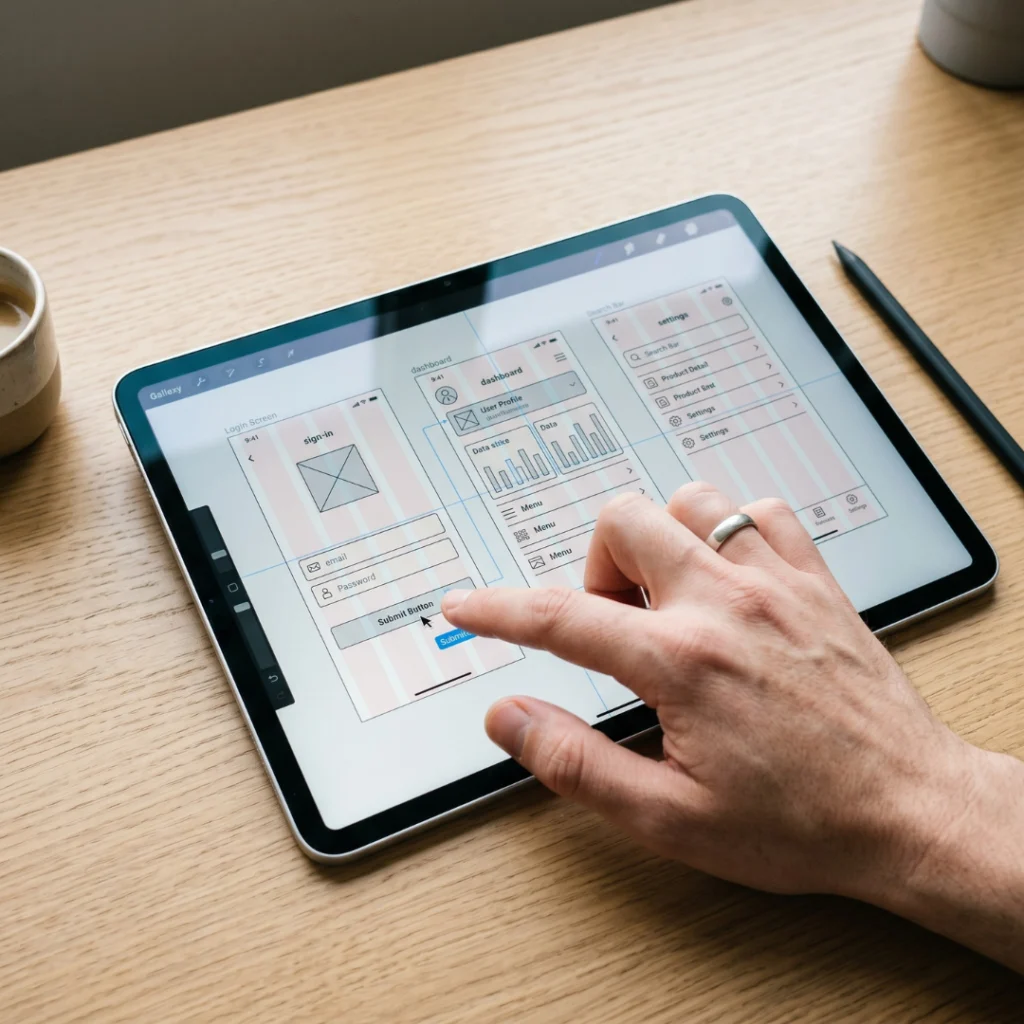
A blueprint or architectural design is required before beginning construction on a dwelling. The blueprint for your mobile apps can also be viewed as UI/UX design.
UX design is the process of designing a product that is both pleasurable to use and offers individuals a meaningful and relevant experience in their lives. Interface design, content design, and sound design are all taken into account as part of the overall consumer journey.
On the other side, UI design refers to your mobile app’s graphical user interface. UI and UX collaborate to ensure that your mobile app provides the best user experience possible.
How Can I Ensure Good UI/UX Design?
To create a good UX design, consider the following elements:
- Useful: The system must meet the user’s wishes and needs.
- Simple and self-explanatory: The method should be as straightforward and uncomplicated as feasible.
- Desirable: The system’s design should elicit good emotions and appreciation. People should be encouraged to use your method.
- Findable: The system’s navigation should be straightforward and self-explanatory. Additionally, users must be able to rapidly locate critical information.
- Accessible: Disabled users, such as those with low vision, must be able to utilize your system and have an equal user experience as non-disabled users.
- Credible: Consumers must trust you and your products.
4 Steps to Create Great UI/UX
The following are basic yet effective procedures we take to ensure that your mobile app has a fantastic UI design and a positive user experience.
Wireframe
The wireframe can be regarded as the application’s basis. It helps to comprehend the system’s flow and gives a rudimentary idea of how it might function.
The wireframe helps to properly estimate the development timeline. It also helps designers comprehend the system flow and create precise, correct designs.
Style Guide
Style standards can serve as a foundation for long-term evolution, changing design and development across several parties while taking into consideration platform variations. It also allows topic interchange.
Some of the factors to consider when building a mobile app include:
- Fonts
- Colours
- Graphics
- Layout Components
- Menu & Bar
Mockup
Mockups for mobile apps allow a company to present its design before beginning production. They provide insight into how the final designs will look and let your team to get important client or user feedback before moving forward with the project. Mobile app designers typically utilize Sketch, Figma, Adobe XD, or Photoshop to create mockups. To design a mockup for your mobile app, here are some tips to consider:
- Identify your target demographic
- Ensure that your mobile app is straightforward to use
- Include a whole surface layer in your mockup
Prototype
A mobile app prototype is a rudimentary representation of a product in use. Prototypes are used in mobile app development to create an idea of the product’s appearance and feel, which helps to test how customers use and respond to the overall user experience (UX) design.
Figma, Invision, Mockplus, and Framer are some prominent prototyping tools. A typical mobile app prototype will include an app icon, a splash screen (the first screen), a login or sign-up form, and a home page.
Revenue Discovery prepares two UI/UX options for you. After receiving the samples, we will wait for your response and make any modifications based on your preferences. This is only one of the initial steps of application development.
After finalizing the design, we create a methodical mobile application development process flow to begin creating a user-centric solution utilizing Flinto or Invision. We create an up-front design for your entire project without writing a single line of code.
Development of Your Mobile Application
After creating the app designs, mobile app developers will proceed to put everything into motion. To ensure the optimal workflow, the project manager will outline tasks for developers to do while also setting milestones.
Revenue Discovery’s mobile app development can be split into three sections:
Front-end development
It creates the appearance of your mobile app based on your UI/UX design, allowing your users to interact with and use the app.
Backend development
Backend development enhances the user experience of frontend applications. The mobile app backend includes database and server-side objects that underpin your app’s operation.
API Integration
API integration joins two or more apps via their APIs, allowing the systems to exchange data. It enables one software service to access data from another without the developer knowing how the latter operates.

Testing Your Mobile Application
Mobile application testing is a complicated and diverse procedure that includes evaluations of essential mobile app elements such as usability, functionality, and dependability.
Mobile app testing is a key stage in ensuring an app’s long-term viability in today’s market. To ensure that the program provides value to end users, it is also examined in areas such as performance, security, and usability.
There are two primary categories of mobile device testing:
Functional Testing
Functional testing evaluates an application’s functionality against a set of criteria or specifications. It frequently involves a study of the underlying code.
For example, functional testing compares actual outputs to predicted behaviours to provide a more complete picture than analyzing individual modules separately.
Non-functional testing
Non-functional testing verifies how well software works. Non-functional testing encompasses performance, load, stress, volume, security, upgrade, and installation testing, as well as recovery testing.
How do we test mobile apps?
During our QA testing, we will run functional and non-functional tests to assess usability, interface compatibility, and performance. We have a variety of iOS and Android devices to test, find, and fix UI flaws. Devices differ in size, screen size, and operating system version.
As a result, this type of testing ensures that no functional flaws cause problems when the app is live and being used by app users.
Once we’ve validated that the app is bug-free, QA will send a release notice with each build release, keeping track of your mobile app’s testing progress.
Launching Your Mobile Application
When you’re ready to release your app, you’ll need to go through several distribution strategies based on the platform you developed for.
The mobile application distribution approach is fairly simple. You must submit your program to Apple’s App Store or Google’s Play Store, or choose private distribution.
Here are some best practices you should follow before launching your mobile app on the relevant app store:
A. Check Your Mobile App Plan
Before publishing your app, make sure it meets all of the initial requirements and plans.
B. Evaluate Your Performance
It is vital to reconsider methods and plans for obtaining the predefined features in the mobile application. Check your mobile app testing results again to confirm that it passes all needed tests and evaluations.
C. Make Security Your Main Priority
To protect the data of users and organizations, your app must include conventional security measures. You should consider approaches such as code security, data encryption, high-level authentication, and the use of an authorized application programming interface.
D. Remember To Promote Your App
Don’t forget your marketing strategy! A successful app must operate in tandem with a solid marketing campaign to reach the goal of mobile app development.
E. Keep in mind the App Store Development Guidelines
Because app stores serve as an ecosystem for many users and developers, specific norms and rules are essential to ensure a safe user experience. Ensure that your mobile app meets all of the requirements of the app store. If you are unsure about any details, consult an expert.
Mobile App Support and Maintenance
It is vital to monitor your app’s performance after launch, check user reviews, and occasionally interact with end users to identify usability issues. Nothing beats honest customer feedback.
Depending on your goals, you can establish specific KPIs and employ analytics tools to track them. After a while, you’ll have a lot of feedback to help you establish your strategy for future product enhancement.
Hire a Mobile App Development Team
And there you have it: the ultimate guide to mobile app development!
I hope this article helps you understand the entire development process for a new app.
However, if you’re seeking a mobile app development service that can bring your ideas to life and produce high-quality outcomes, go no further than Revenue Discovery.
We provide a wide variety of mobile app development services that benefit corporations and the companies we work with. Our committed staff of mobile app developers meets your unique company needs through a variety of services. For further details, please refer to our case studies.
Frequently Asked Questions
What are the primary steps in designing a mobile application?
There are six major steps in designing a mobile app:
- Brainstorm ideas for mobile apps.
- Consider your mobile app’s UI and UX design.
- Develop your mobile app using appropriate technology.
- Test your mobile application.
- Launch your mobile app on the app stores.
- Monitor and continuously improve your mobile app.
What is the most popular mobile app development framework?
React Native is one of the most popular mobile app development frameworks. Aside from providing a clean, fluid, and responsive user interface, it enables developers to share code across web and mobile platforms to create iOS and Android apps.
How long does it take to create an application?
In Malaysia, it should take four to six months to create the first version of your app.
Remember that the time required to develop an app varies. As a result, the timeline will fall outside of the specified range.
Nonetheless, we recommend limiting the app development schedule to six months; otherwise, your app may be overbuilt.
How much does it cost to create a mobile application?
Mobile app development in Malaysia typically costs between RM30,000.00 and RM50,000.00, although prices can vary depending on a number of factors.
Consider the sorts of users who will interact with your app, the app platforms (native, hybrid, or cross-platform), the app development duration, server architecture, and so on.
If you require assistance in determining the budget for your app development, please contact us right away.
Is it difficult to design a mobile application?
The app concept and complexity determine how an app is developed. The cost of developing an app is also heavily influenced by the desired end product.
To determine your app’s design and development objectives, you should consult with an expert app development company such as ours. As a result, app development can be complicated or simple, depending on the features and functionalities.